Paul Jolly Photography Chapter 6
The Flash
Again it is all about balancing the amount of light reaching the sensor. The two controls the flash can give you are the
power output of the flash and the time the flash is on for; all too often this is just a single control where the light
output level from the flash is fixed and you can just vary the time the flash is on, but do not be downhearted there are
ways and means here too.
One way to vary the light level is to bounce the light from the flash via a card or some other partly reflective surface
or use a dispersive cover (soft-box or diffuser) to cut down the light level, or even move the flash further away
(assuming it is not attached to the camera).
The aperture setting will still provide depth of field and simultaneous control of the light level but the exposure time
setting of the camera is used to determine the amount of light that you will have in the photograph from objects not lit
by the flash.
Night or evening flash photography provides you with two triangles to juggle for the effect you want; the triangle for
the flash and the triangle for the background.
There are two common points for the triangles, the ISO setting and the aperture, thus the time of exposure is the only
difference you can exploit; or so it seems at first.
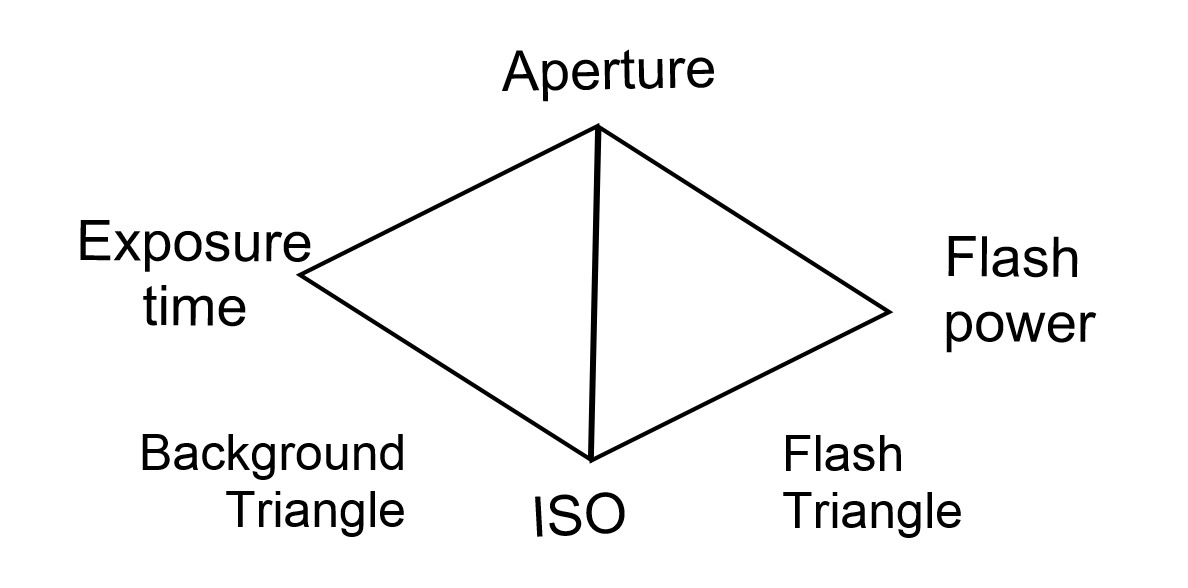
The background will have to be longer exposure than the flash if only because the camera shutter has to be fully open
before you can fire the flash and then the shutter has to close.
What else to we have to vary the exposure?
We can control the light level; the background is normally lit by steady light; the sun, indoor lighting, the moon:
whereas our flash light level can be varied as previously discussed. Bouncing the light using a card, umbrella, even
the room walls or ceiling will change the level. Not to forget our flash is not always tethered to the camera, we can
move it horizontally or vertically to light the areas of the image required. See the chapter on first and second curtain sync for more effects.


(C)2024 P.Jolly. Page last updated 20240713