Background
This page describes how to use a four track tape recorder to record multiple instruments.
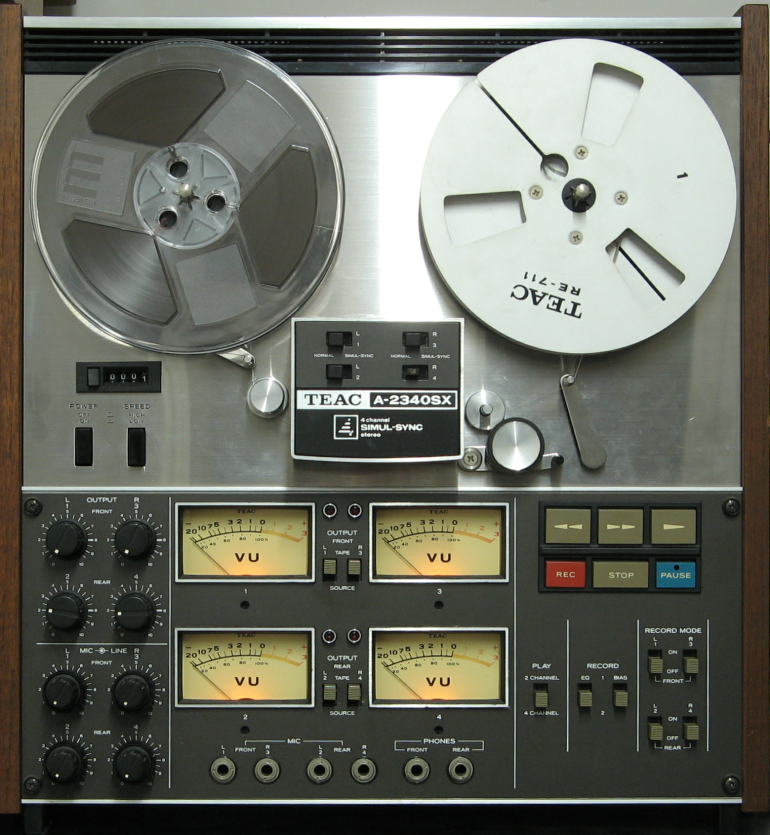
For this we assume a TEAC A-2340SX machine with simulsync.
We are trying to produce a final tape with good quality and also to have a metronome track available.
We also assume one instrument recorded at a time.
When we use simulsync output the quality is low and so the method explained here works round this problem to provide the best available result.
How it works
What we do is to record the metronome on track 1 (we call this the click track).
Rewinding the tape we can play the click track on the simulsync output while recording the first instrumenton track 2.
We can again rewind the tape and play the click track and the first instrument through simulsync while recording the second instrument on track 3.
We could do this again for the third instrument on track 4 but now there is no room left for any more instruments :-(
so instead we mix the first and second instruments using the playback head and, after rewinding, record the result on track 4 giving a high quality mix.
However the click track is out of alignment from the mix. To fix this we look at the track allocations; at this point the mix is on track 4 and the original click track is on track 1: However because of the mis tracks 2 and 3 are out of date and can be overwtitten
The next step is to rewind the tape and using the playback head output record the click track from track 1 onto track 2 (this is the only recording done at this step)
This last step re-alignes the click track to the new mix. Now we have the mix on track 4, the new click track on track 2 and unused info on tracks 1 and 3
Now using simulsync we playback tracks 2 and 4 and record the next instrument onto track 3
if we only want one new instrument then using simulsync playback tracks 2, 3 and 4 whilst recording the fourth instrument onto track 1.
so not on playback for the final we have click track on track 1 (not added to the mix) instruments 1 and 2 on track 4, instrument 3 on track 3, instrument 4 on track 1.
If more instruments are required then skip the last recording and make a new mix track and a new recording of the click track.
Method
| Take | Record | Playback | To performers headset |
|---|
| 1 | click on track 1 | - | No |
|---|
| 2 | Instrument 1 on track 2 | track 1 simulsync | Yes |
|---|
| 3 | Instrument 2 on track 3 | Tracks 1 and 2 both simulsync | Yes |
|---|
| 4 | mix on Track 4 | Tracks 2 and 3 playback head | No |
|---|
| 5 | to Track 2 | Track 1 from playback head | No |
|---|
| 6 | Instrument 3 on track 3 | Tracks 2 and 4 both simulsync | Yes |
|---|
| 7 | Instrument 4 on track 1 | Track 2, 3 and 4 both simulsync | Yes |
|---|
| 8 | Track 1, 2, 3 and 4 from playback head | Yes |
|---|
| 9 | only playback from 1, 3 and 4 if no click track needed | Yes |
|---|
Notes:
If you just want to use the tape as a background for your final instrument then mix the new instrument live with the recording onto a seperate machine or for live transmission, clearly the click track should only be audible by the performer not on the mix tracks.
Text and Pictures (C)2026 P.Jolly all rights reserved. Page last updated 20260324